Manage Subscription Policies (Business Plans)
Subscription-level rate limiting policies (Business Plans) are used to limit the number of requests an application can make to an API during a given period of time.
Default Tiers
The system includes the following default tiers:
- Bronze: 1000 requests per minute
- Silver: 2000 requests per minute
- Gold: 5000 requests per minute
- Unlimited: Allows unlimited access.
Note
Administrators can disable the Unlimited tier by editing the enable_unlimited_tier element under [apim.throttling] in the <API-M_HOME>/repository/conf/deployment.toml file.
Adding a New Subscription-Level Rate Limiting Tier
- Sign in to the Admin Portal using the URL
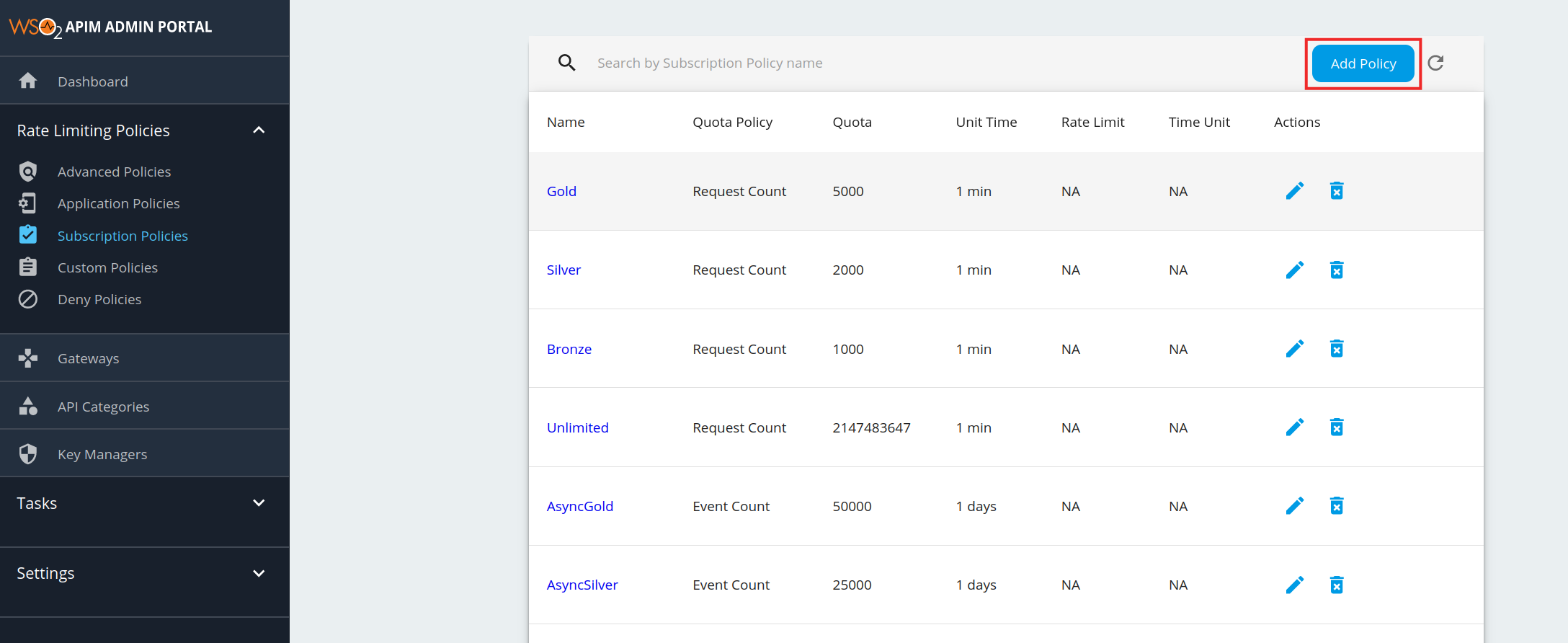
https://localhost:9443/adminand your admin credentials. - Click Subscription Policies under the Rate Limiting Policies section. The existing set of rate limiting tiers are displayed.
-
To add a new tier, click Add Policy.
Note
Unauthenticated tier
When you are adding a new Subscription level rate limiting tier, you will see the existing list of subscription tiers in the Subscription Tier List. In this list, you will find a tier named Unauthenticated, which has a request quota of 500. This is the subscription tier, which is automatically applied when the authentication type of your resources is 'None'. That is when you can invoke APIs without tokens. And this tier is not visible in the rate limiting tier list of the application.
-
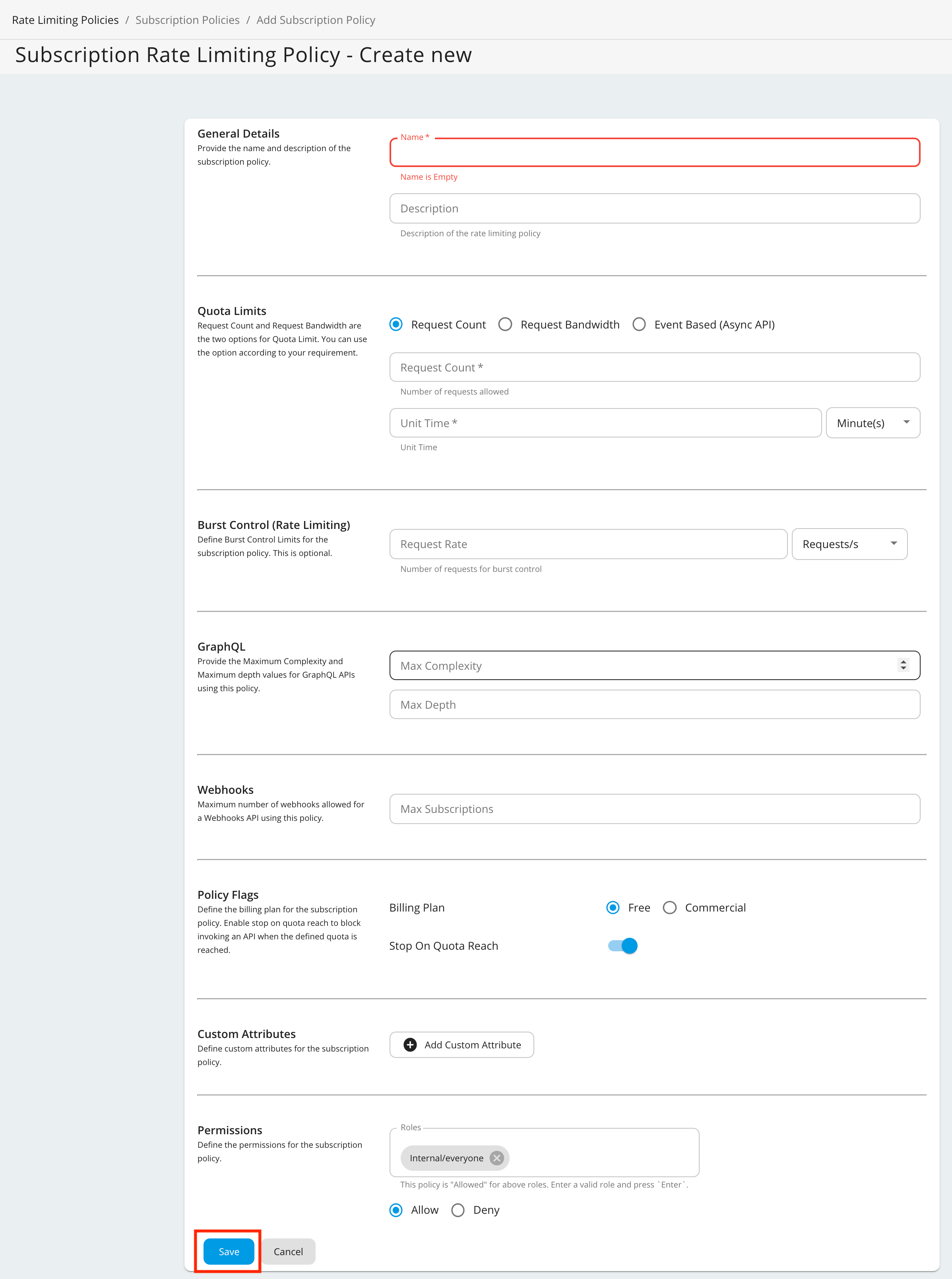
Fill in the details required by this form and click Save once you are done.
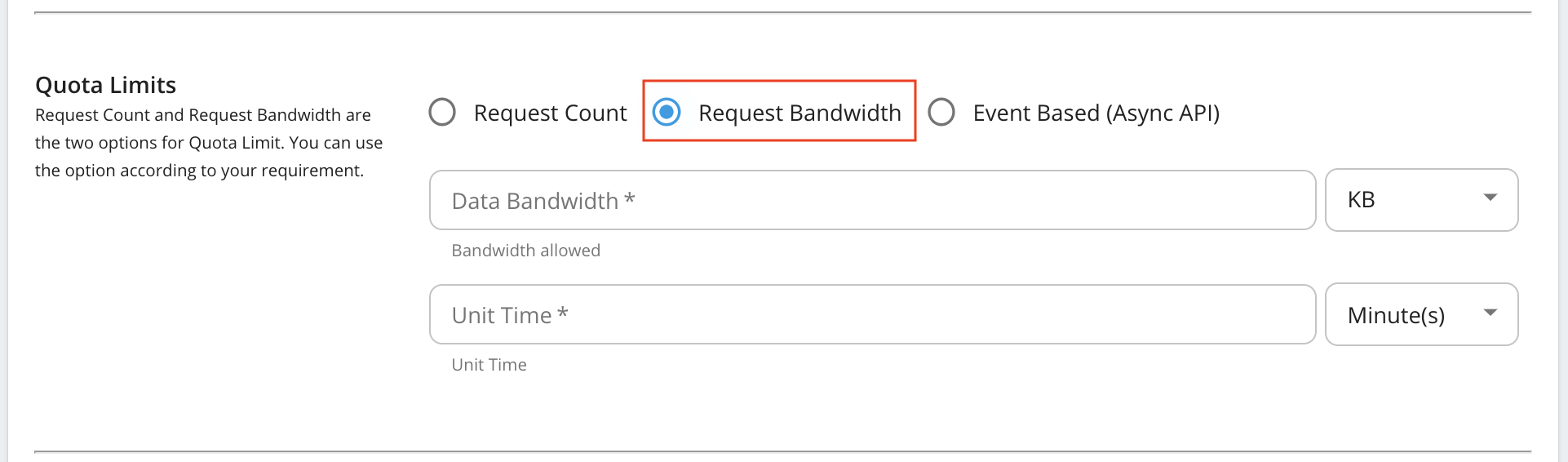
Request bandwidth based quota limits
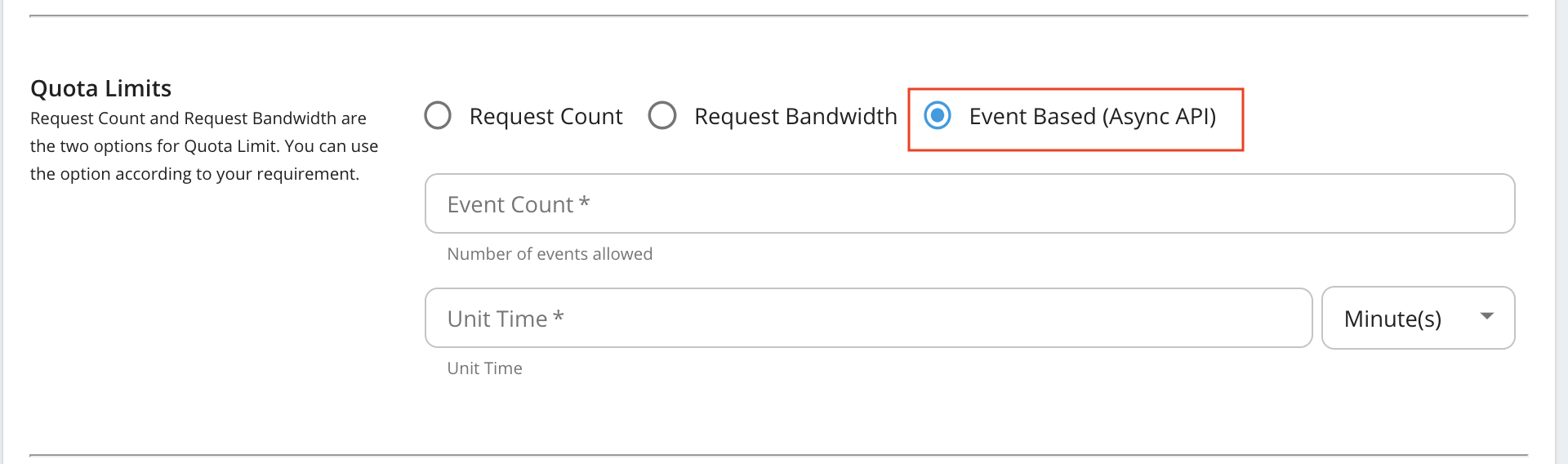
Event Based (AsyncAPI) quota limits
Note
- Event Based (Async API) - These configurations are applicable to all the Streaming APIs (WebSocket, SSE, and WebHook (WebSub) APIs).
- WebHooks - This is only applicable to the WebHook (WebSub) APIs
Given below are the descriptions of the fields you find in the form:
Field Description Request Count/Request Bandwidth/Event Count The maximum number of requests/maximum bandwidth/maximum events allowed to the API within the time period given in the next field. Unit Time Time within which the number of requests given in the previous field is allowed to the API. This can be defined in minutes, hours, days, weeks, months or years. Burst Control (Rate Limiting) You can define the request count/bandwidth per unit time on an addition layer by using rate limiting. This is usually a smaller number of requests/bandwidth for a shorter time span than what is enforced in the above fields. For instance, if there's a subscription level policy enforced over a long period, you may not want users to consume the entire quota within a short time span. Enforcing a rate limit protects the backend from sudden request bursts and controls the usage at a subscription and API level. GraphQL Provide the maximum complexity and maximum depth values for GraphQL APIs using this policy. WebHooks Maximum number of WebHooks allowed for a WebHooks API using this policy. Stop On Quota Reach This indicates the action to be taken when a user goes beyond the allocated quota. If the check box is selected, the user's requests are dropped and an error response (HTTP Status code 429) is given. If the check box is cleared, the requests are allowed to pass through. Billing Plan This field only makes sense if you have API Monetization enabled. The available billing plans are Free, Commercial, and Freemium. An API is tagged/labelled as Free, Paid, or Freemium depending on its subscription tiers(e.g., Unlimited, Gold, etc.), which are the tiers selected when creating an API. Custom Attributes You can choose to display additional information about tiers using custom attributes during custom implementations. The main objective of these fields are to provide more information regarding the tier to Application Developers at the time of API subscription. An example usage of custom attributes is API Monetization. See Enabling Monetization of APIs- for more information on practical usage of custom attributes in the subscription tier. Permissions You can allow or deny permission for specific roles. Once permission is denied to a role, the new subscription tier that you add here will not be available to that role in the Developer Portal. Note
Billing plan
- Free - If all subscription tiers are defined as Free, the API uses the Free billing plan and the API is labeled as Free in the Developer Portal.
- Paid - If all subscription tiers are defined as Paid, the API uses the Commercial billing plan and the API is labeled as Paid in the Developer Portal.
- Freemium - If the API has a combination of Free and Paid subscription tiers, the API uses the Freemium billing plan and the API is labeled as Freemium in the Developer Portal.
This labeling happens on the Developer Portal only if monetization has been enabled. For information on how to enable monetization and how to tag subscription tiers, see Configuring API Monetization Category Labels.
You have now successfully added a new subscription-level rate limiting policy.
GraphQL Query Limits in Subscription Policies
Subscription policies for GraphQL APIs support two additional types of limits:
Query Depth Limitation
GraphQL schemas often have circular relationships, which can lead to deeply nested queries. Query Depth Limitation protects GraphQL APIs by restricting how many levels deep a query can nest.
The request is allowed or rejected based on the depth of the requested query and the maximum depth value configured in the subscription policy.
When adding a subscription policy, you can configure the GraphQL Max Depth value to limit query nesting depth.
Query Complexity Limitation
Some fields in a GraphQL schema are more costly to compute than others. Query Complexity Limitation addresses this by assigning complexity values to each field in the schema, describing the computation cost of resolving that particular field.
With this strategy, a request is allowed or rejected based on the complexity of the query and the configured max complexity value of the subscription policy.
Field Complexity Values
- Each field in the GraphQL schema can be assigned a complexity value
- If no complexity is defined for a field, by default it gets a value of 1
- Fields requiring expensive service calls should have higher complexity values
- Fields that are easy to resolve should have lower complexity values
When adding a subscription policy, you can configure the GraphQL Max Complexity value to limit query complexity.
At runtime, the Gateway calculates the total complexity of the query and blocks it if it exceeds the specified max complexity in the subscription policy.
Streaming API Limits in Subscription Policies
Subscription policies for Streaming APIs (WebSocket, WebHook/WebSub, and SSE APIs) support event-based rate limiting:
Rate Limiting Policy Types
-
Count-based Rate Limiting Policy - Rate limiting based on the number of total events an application can receive (e.g., 1M total events, 10M events, or Unlimited events)
-
Time-based Rate Limiting Policy - Rate limiting based on how long the client can subscribe to a given topic/API (e.g., 1 week, 1 month, or forever)
-
Count-time Hybrid Rate Limiting Policy - Combines both time-based and count-based policies (e.g., 1M events within a day)
Default Business Plans for Streaming APIs
The following default Business Plans are available for Streaming APIs:
| Default Business Plans | Applicable API |
|---|---|
| AsyncGold : Allows 50000 events per day | WebSocket, SSE |
| AsyncSilver : Allows 25000 events per day | WebSocket, SSE |
| AsyncBronze : Allows 5000 events per day | WebSocket, SSE |
| AsyncUnlimited : Allows unlimited events | WebSocket, SSE |
| AsyncWHGold : Allows 10000 events per month and 1000 active subscriptions | WebHook/WebSub |
| AsyncWHSilver : Allows 5000 events per month and 500 active subscriptions | WebHook/WebSub |
| AsyncWHBronze : Allows 1000 events per month and 500 active subscriptions | WebHook/WebSub |