Getting Started with MCP Gateway
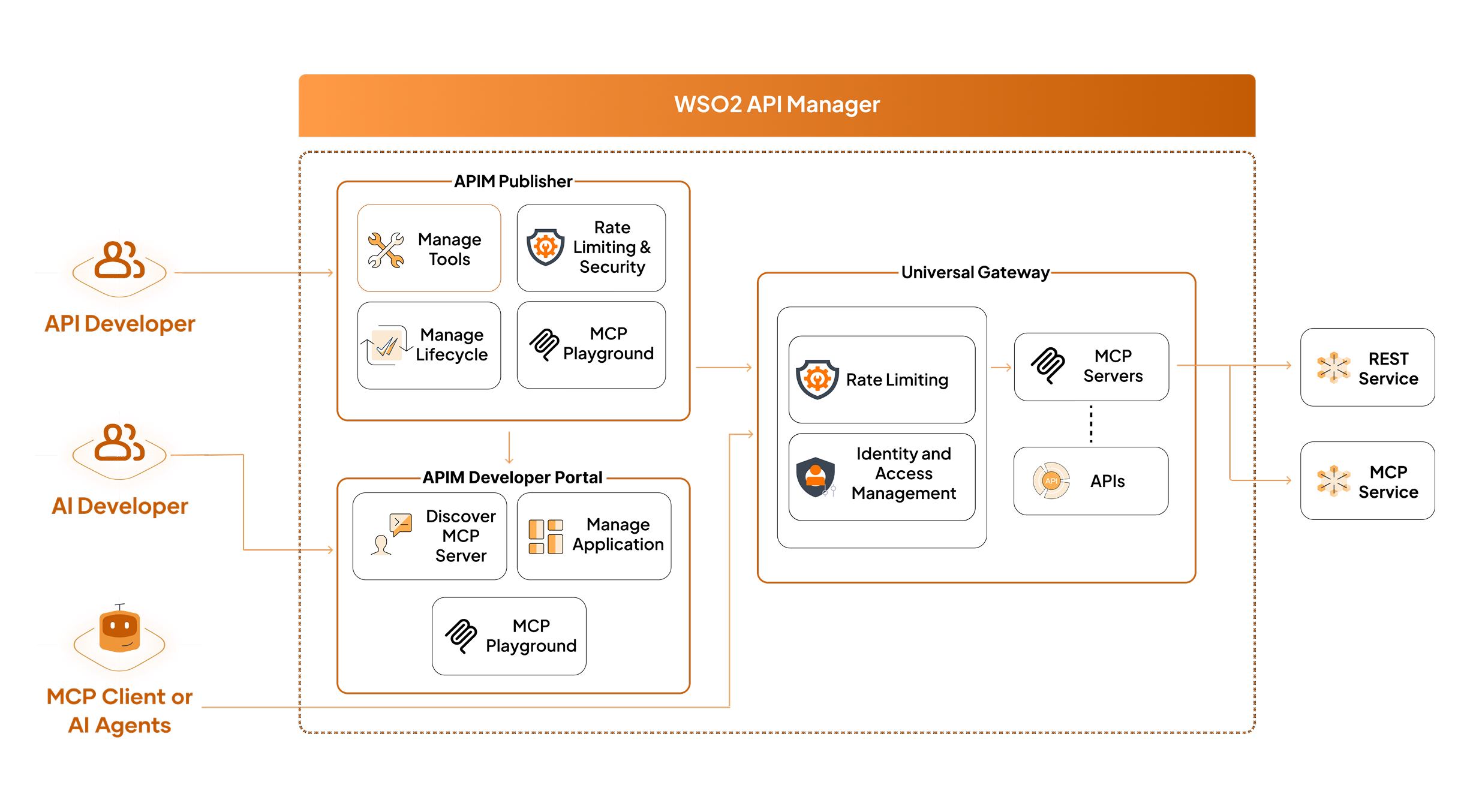
WSO2 API Manager provides a unified platform for managing MCP Servers, enabling you to transform APIs into AI-ready tools and govern their lifecycle. With a centralized control plane, you can create, discover, and manage MCP Servers efficiently—streamlining workflows for both API developers and AI agent builders.
Note
This guide walks you from defining tools to deploying and publishing a MCP Server in WSO2 API Manager.
Quick Start (at a glance)
- Choose a creation path (see below).
- Define/confirm tool schemas (inputs/outputs, descriptions).
- Attach policies (auth, rate limiting).
- Publish & test (run discovery, call tools, review analytics).
Tip
Keep input schemas minimal and strongly typed; LLMs perform better with concise, unambiguous contracts.
Next Step → MCP Server Creation Options
WSO2 API Manager offers three ways to create a MCP Server:
- Create a MCP Server by Importing an OpenAPI Definition – Generate tools and configuration from an existing OpenAPI.
- Create a MCP Server Using an Existing API – Select an API already in APIM and convert operations into MCP tools.
- Proxy a Existing MCP Server – Wrap an external MCP server for governance, security, and analytics.