Configure WSO2 IS 7.x as a Key Manager
WSO2 API Manager supports multiple Key Managers. As a result, WSO2 API Manager is prepacked with an inbuilt resident Key Manager, and it has the inbuilt capability of configuring WSO2 Identity Server 7.x (WSO2 IS 7.x) as a Key Manager.
Info
This document provides instructions on configuring WSO2 Identity Server 7.x as a Key Manager. If you are using an older version of WSO2 Identity Server, see Configure WSO2 IS as a Key Manager.
Note
Role Based Authorization based on the WSO2 Identity Server 7 Role Based Authorization model is supported from WSO2 Identity Server 7.0.0.65 update level onwards.
Limitations of using WSO2 IS 7.x as a Key Manager
Data models of WSO2 API Manager 4.6.0 and WSO2 Identity Server 7.x are different. Therefore, when using WSO2 API Manager 4.6.0 with WSO2 Identity Server 7.x as the key manager,
- Tenant sharing has to be configured. Please refer Tenant sharing between WSO2 API Manager and WSO2 IS 7.x
- To configure WSO2 IS 7.x as default key manager please refer Configuring WSO2 IS 7.x as the default key manager.
Follow the steps given below to configure WSO2 IS 7.x as a Key Manager component.
Step 1 - Configure WSO2 IS 7.x
-
Download and install WSO2 Identity Server 7.x.
If you downloaded the archive, extract it.
<IS7_HOME>refers to the root folder of the extracted WSO2 IS 7.x.Tip
Refer to the Release Matrix for compatible product versions.
-
Add following configurations in the
<IS7_HOME>/repository/conf/deployment.tomlfile.[oauth] authorize_all_scopes = true [[resource.access_control]] context="(.*)/scim2/Me" secure=true http_method="GET" cross_tenant=true permissions=[] scopes=[] [[event_listener]] id = "token_revocation" type = "org.wso2.carbon.identity.core.handler.AbstractIdentityHandler" name = "org.wso2.is.notification.ApimOauthEventInterceptor" order = 1 [event_listener.properties] notification_endpoint = "https://<APIM_HOST>:<APIM_PORT>/internal/data/v1/notify" username = "${admin.username}" password = "${admin.password}" 'header.X-WSO2-KEY-MANAGER' = "WSO2-IS"Note
Before you begin:
You need to import the public certificate of the WSO2 Identity Server 7.x to the truststore of the WSO2 API Manager, and vice-versa. For information on importing the certificates, see the Importing certificates to the truststore guide.
-
Download notification.event.handlers-2.0.5.jar and add it to
<IS_HOME>/repository/components/dropins -
Start WSO2 Identity Server 7.x with a port offset. portOffset is required only if you are running both API-M and IS 7.x in the same JVM.
sh wso2server.sh -DportOffset=1
Step 2 - Configure WSO2 API Manager
Note
Configuration values given in this section are based on the assumption that, WSO2 IS 7.x runs on the same JVM as WSO2 APIM, with a port offset of 1 (i.e: localhost:9444).
-
Start WSO2 API Manager.
<APIM_HOME>refers to the root folder of the extracted WSO2 APIM. * Sign in to the Admin Portal.https://<hostname>:9443/adminhttps://localhost:9443/admin* Click Key Managers. * Click Add Key Manager to add the configuration related to a new Key Manager. * Enter a Name and Display Name, and select WSO2 Identity Server 7 as the Key Manager Type. * Under the Key Manager Endpoints section, provide the following values:Note
You can use
https://localhost:9444/oauth2/token/.well-known/openid-configurationas the Well-known URL, and click on Import to populate most of the fields mentioned below, Grant types, and the Certificates section.Important
When importing configurations using the well-known URL, manually set the value of UserInfo Endpoint to
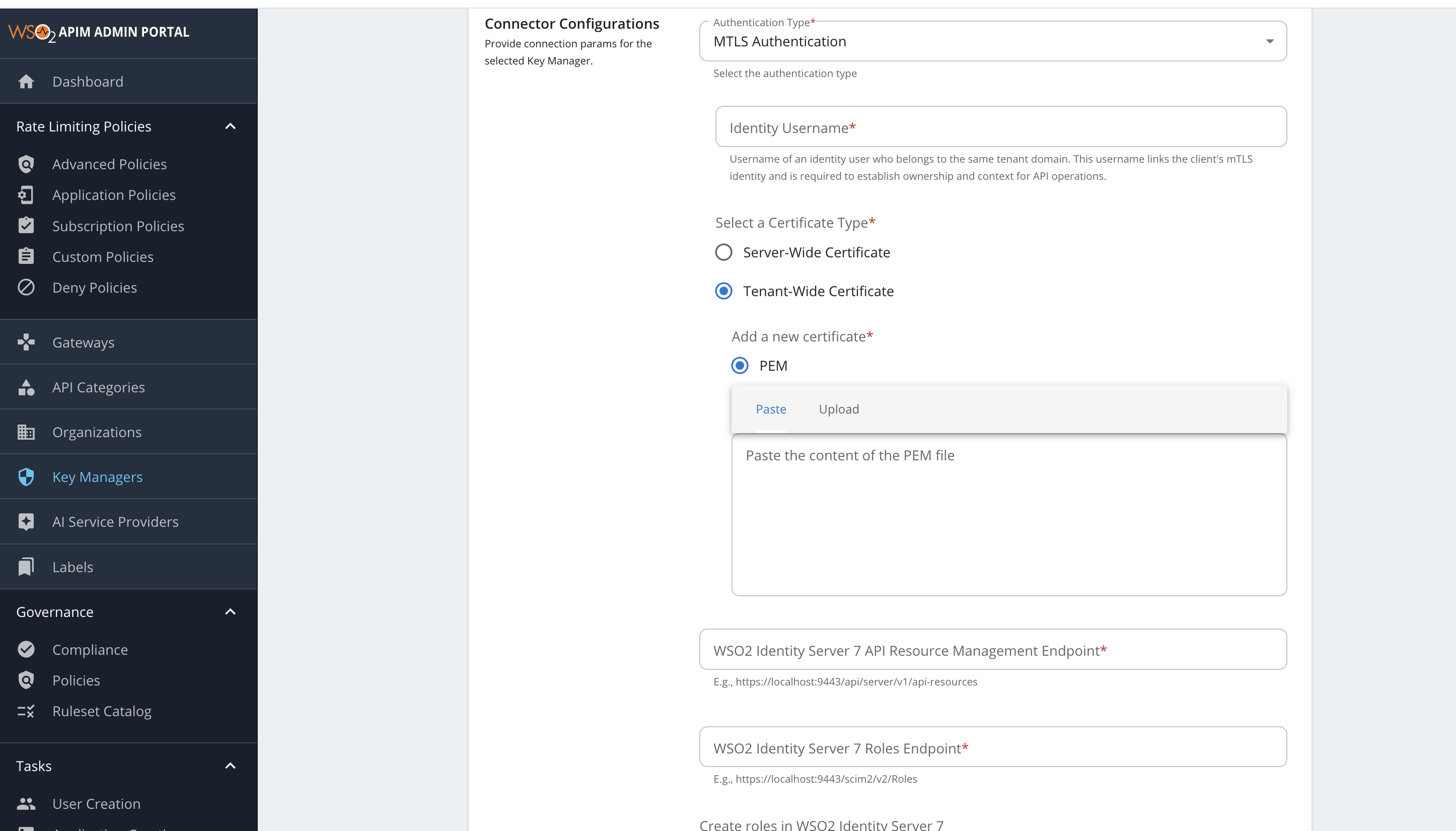
https://localhost:9444/scim2/Me. The auto-import populates this field withhttps://localhost:9444/oauth2/userInfo.Configuration Value Issuer https://localhost:9444/oauth2/tokenClient Registration Endpoint https://localhost:9444/api/identity/oauth2/dcr/v1.1/registerIntrospection Endpoint https://localhost:9444/oauth2/introspectToken Endpoint https://localhost:9444/oauth2/tokenDisplay Token Endpoint https://localhost:9444/oauth2/tokenRevoke Endpoint https://localhost:9444/oauth2/revokeDisplay Revoke Endpoint https://localhost:9444/oauth2/revokeUserInfo Endpoint https://localhost:9444/scim2/MeAuthorize Endpoint https://localhost:9444/oauth2/authorizeScope Management Endpoint https://localhost:9444/api/identity/oauth2/v1.0/scopes* Under Grant types, provide all the following: password,client_credentials,refresh_token,urn:ietf:params:oauth:grant-type:saml2-bearer,iwa:ntlm,urn:ietf:params:oauth:grant-type:device_code,authorization_code,urn:ietf:params:oauth:grant-type:jwt-bearer,urn:ietf:params:oauth:grant-type:token-exchange.* Under Certificates section, select JWKS. Enter https://localhost:9444/oauth2/jwksas the URL.* Under Connector Configurations, provide the following values: Configuration Value Authentication Type API Manager supports either Basic Authentication (username, password) or Mutual SSL (using server wide certificate or tenant wide certificate). Identity Username (for Mutual SSL only) You must provide the tenant-qualified username of a user in WSO2 IS 7.x, belonging to the same tenant domain, who has the required permissions to invoke the DCR, Introspection, API Resource Management, and Roles APIs. The WSO2 IS 7.x uses this user to perform authorization when processing related requests. Certificate Type (for Mutual SSL only) - Server-wide: Uses an existing certificate trusted by both API Manager and WSO2 IS 7.x truststores.
- Tenant-wide: Allows uploading a new certificate that is already trusted by WSO2 IS 7.x.Username (for Basic Auth only) adminPassword (for Basic Auth only) adminWSO2 Identity Server 7 API Resource Management Endpoint https://localhost:9444/api/server/v1/api-resourcesWSO2 Identity Server 7 Roles Endpoint https://localhost:9444/scim2/v2/RolesCreate roles in WSO2 Identity Server 7 Enable this if you need to create roles in WSO2 Identity Server 7.
Note
When configuring a key manager manually, keep in mind to provide tenant qualified URLs
Role Creation in WSO2 Identity Server 7.x
Note
Enabling role creation according to this convention is supported from WSO2 API Manager 4.4.0.5 and WSO2 Identity Server 7.0.0.81 update levels onwards.
By default, roles are not created in WSO2 Identity Server 7.x, and it is assumed that the roles will be manually created by the user in WSO2 Identity Server 7.x.
You can enable role creation in WSO2 Identity Server 7.x by enabling the Create roles in WSO2 Identity Server 7 option in the Connector Configurations section.
The following property should be enabled in WSO2 Identity Server 7.x, to be able to create system_primary_<roleName> roles.
[role_mgt]
allow_system_prefix_for_role = true
When enabled, the following naming conventions are followed when creating/accessing roles in WSO2 IS 7.x, corresponding to the types of WSO2 APIM roles.
| Type of role in WSO2 API Manager             | Naming convention in WSO2 IS 7.x                           |
|----------------------------------------------|------------------------------------------------------------|
| _PRIMARY_ roles (eg: `manager`)              | `system_primary_<roleName>` (eg: `system_primary_manager`) |
| _Internal_ roles (eg: `Internal/publisher`)  | `<roleName>` (eg: `publisher`)                             |

!!! Note
    **_Application_ roles** are not used.