Moesif Analytics Integration
New in 4.6.0 — Moesif-powered WSO2 Analytics replaces Choreo Analytics for enhanced insights and observability.
Overview
This guide outlines the steps required to integrate Moesif Analytics with WSO2 API Manager. The integration enables you to collect and publish API analytics data to the Moesif dashboard, providing insights into API usage, traffic trends, and error tracking in near real-time.
Prerequisites
Before you begin, ensure you have:
- WSO2 API Manager 4.6.0
- Administrative access to WSO2 APIM configuration files
- A valid email address for Moesif account creation
- Estimated setup time: 5-10 minutes
Analytics Data Flow
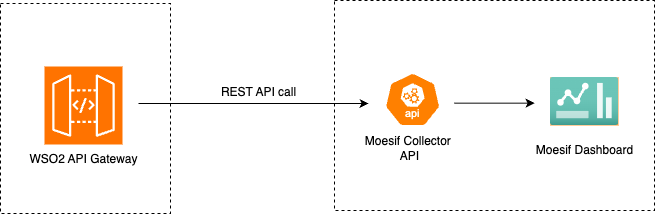
The Moesif integration captures both successful and failed API invocations in WSO2 API Manager and publishes them to your Moesif dashboard in near real-time. This allows for powerful analytics and monitoring capabilities.
Step 1: Set Up Your Moesif Account
1.1 Create an Account and Log In
- Go to Moesif's official website for WSO2 API Manager
- Sign up for a new account or log in to your existing account
- Follow the onboarding wizard to get the Moesif Key
- Copy the Moesif API Key from the API Keys section (you will need this in Step 2)
Note: For more detailed instructions and advanced configuration options, refer to the official Moesif Documentation.
Step 2: Configure WSO2 API Manager
To enable Moesif analytics in WSO2 APIM, you need to update the deployment.toml configuration file.
2.1 Configure the deployment.toml File
- Navigate to the
<APIM-HOME>/repository/confdirectory - Open the
deployment.tomlfile in a text editor - Add or update the
apim.analyticsconfiguration with the following:
[apim.analytics]
enable = true
type = "moesif"

[apim.analytics.properties]
moesifKey = "YOUR_MOESIF_API_KEY_HERE"
moesif_base_url = "https://api.moesif.net"
send_headers = false
Replace YOUR_MOESIF_API_KEY_HERE with the actual API key you copied from Step 1.4.
Configuration Parameters
| Name | Description | Default Value | Possible Data Types | Optional |
|---|---|---|---|---|
| enable | Enable/Disable Analytics | true | Boolean | Yes |
| type | Type of Analytics platform | moesif | String | Yes |
| moesifKey | Moesif API Key | - | String | No |
| moesif_base_url | Base URL of Moesif API | https://api.moesif.com | String | Yes |
| send_headers | Whether to send request and response headers to Moesif | false | Boolean | Yes |
2.2 Restart WSO2 API Manager
After saving the configuration changes, restart WSO2 API Manager for the changes to take effect:
cd <APIM-HOME>/bin
./api-manager.sh stop
./api-manager.sh start
Security: Masking Sensitive Information
Warning: Ensure that you do not expose your Moesif API Key in public repositories or logs, as it can lead to unauthorized access to your analytics data.
Understanding Data Privacy Requirements
WSO2 Analytics data may contain PII (Personally Identifiable Information) such as user IP addresses and usernames. Additionally, when send_headers is set to true, request and response headers may contain sensitive information like authorization tokens or API keys.
To comply with data privacy regulations (GDPR, CCPA, etc.) and protect user privacy, it is strongly recommended to mask or anonymize such sensitive information before sending it to Moesif.
Configuring Data Masking
Add the following configuration to your deployment.toml file to enable data masking:
[apim.analytics.mask]
"userIp" = "IPV4"
"userName" = "EMAIL"
"userId" = "EMAIL"
"userAgent" = "STRING"
"applicationOwner" = "EMAIL"
response_headers = ["Authorization", "X-API-Key"]
request_headers = ["Authorization", "Cookie"]
Masking Configuration Reference
| Name | Description | Accepted Values |
|---|---|---|
| userIp | Defines the format used to capture and store the user's IP address in analytics records | IPV4, IPV6 |
| userName | Specifies the format of the username field used for analytics or identification | EMAIL, STRING |
| userId | Identifies how the user ID is represented in analytics data | EMAIL, STRING |
| userAgent | Represents the type of the user agent string recorded from the client request | STRING |
| applicationOwner | Specifies the format of the application owner's identifier | EMAIL, STRING |
| response_headers | List of response headers to be masked for analytics or logging purposes | Header keys as strings |
| request_headers | List of request headers to be masked for analytics or logging purposes | Header keys as strings |
Masking Behavior Examples
-
IPV4: Masks the 3rd octet of an IPv4 address
- Original:
192.168.1.98 - Masked:
192.168.***.98
- Original:
-
IPV6: Masks the 4th, 5th, 6th and 7th segments of an IPv6 address
- Original:
2001:0db8:85a3:0000:0000:8a2e:0370:7334 - Masked:
2001:0db8:85a3:****:****:****:****:7334
- Original:
-
EMAIL: Masks the local part of an email address
- Original:
john.doe@gmail.com - Masked:
*****@gmail.com
- Original:
-
STRING: Masks the entire string value
- Original:
JohnDoe - Masked:
*****
- Original:
Analytics Event Types
WSO2 API Manager generates two types of analytics events that are sent to Moesif:
apim_event_response
This event is triggered for each successful API invocation. Even when an API-associated backend returns an error response, it will be logged through this event (as the gateway successfully processed the request).
Event Parameters:
| Parameter | Type | Description |
|---|---|---|
| apiCreator | String | Username of the API creator |
| apiCreatorTenantDomain | String | Tenant domain under which the API was created |
| apiId | String (UUID) | Unique identifier of the API |
| apiMethod | String | HTTP method used in the request (e.g., GET, POST) |
| apiName | String | Name of the API being invoked |
| apiResourceTemplate | String | Resource path template for the API |
| apiType | String | Type of the API (e.g., HTTP, SOAP, GRAPHQL) |
| apiVersion | String | Version of the API |
| applicationId | String (UUID) | Unique identifier of the invoking application |
| applicationName | String | Name of the invoking application |
| applicationOwner | String | Owner of the invoking application |
| backendLatency | Number | Time taken by the backend service to respond (in ms) |
| correlationId | String (UUID) | Unique identifier used to trace the request across components |
| destination | String | Backend endpoint URL to which the request was sent |
| eventType | String | Type of event (e.g., request, response) |
| gatewayType | String | Type of API Gateway handling the request (e.g., SYNAPSE, CHOREO) |
| keyType | String | Key type used for invoking the API (e.g., SANDBOX, PRODUCTION) |
| userName | String | Authenticated username of the API invoker |
| proxyResponseCode | Number | HTTP response code returned by the gateway |
| regionId | String | Identifier of the gateway region where the API was invoked |
| requestMediationLatency | Number | Latency introduced by mediation at the request flow (in ms) |
| requestTimestamp | String (ISO 8601) | Timestamp when the API request was initiated |
| responseCacheHit | Boolean | Indicates whether the response was served from cache |
| responseLatency | Number | Total latency for the response (in ms) |
| responseMediationLatency | Number | Latency introduced by mediation at the response flow (in ms) |
| targetResponseCode | Number | HTTP response code received from the backend service |
| userAgent | String | User agent string of the client (e.g., Chrome) |
| userIp | String | IP address of the client invoking the API |
| commonName | String | Common name extracted from certificate (if applicable) |
| responseContentType | String | Content type of the API response |
| subType | String | Subtype of the API event (e.g., DEFAULT) |
| isEgress | Boolean | Indicates whether the event occurred on the egress path |
| apiContext | String | Context path of the API |
| responseSize | Number | Size of the API response payload (in bytes) |
| requestHeaders | Object | Map of request headers sent to the backend |
| responseHeaders | Object | Map of response headers received from the backend |
| vendorName | String | Name of the AI vendor (e.g., OpenAI) |
| vendorVersion | String | Version of the AI vendor API |
| model | String | Model identifier used (e.g., gpt-3.5-turbo) |
| promptTokens | Number | Number of tokens used for the input prompt |
| completionTokens | Number | Number of tokens used for the AI's generated response |
| totalTokens | Number | Total tokens consumed in the request |
| hour | String | Hour of the request, for usage tracking or analytics |
apim_event_faulty
This event is triggered for each failed or throttled API invocation. This includes requests that failed due to authentication errors, authorization failures, rate limiting, or backend connectivity issues.
Event Parameters:
| Parameter | Type | Description |
|---|---|---|
| apiCreator | String | The creator of the API |
| apiCreatorTenantDomain | String | The tenant domain of the API creator |
| apiId | String | Unique identifier of the API |
| apiMethod | String | The HTTP method used by the API (e.g., GET, POST) |
| apiName | String | The name of the API |
| apiResourceTemplate | String | The template of the API resource accessed |
| apiType | String | The type of the API (e.g., HTTP, REST) |
| apiVersion | String | The version of the API |
| applicationId | String | Unique identifier of the application that makes the API call |
| applicationName | String | Name of the application that makes the API call |
| applicationOwner | String | Owner of the application that makes the API call |
| backendLatency | Long | The time taken by the backend to process the request |
| correlationId | String | Unique identifier for tracking API calls |
| destination | String | The backend URL to which the API call was redirected |
| eventType | String | The type of event |
| gatewayType | String | The type of the API gateway |
| keyType | String | Indicates whether the API key used was for SANDBOX or PRODUCTION |
| platform | String | Operating system used to access the API |
| properties | Object | Properties of the event |
| apiContext | String | The context of the API call |
| userName | String | The username of the individual who made the API call |
| proxyResponseCode | Int | The HTTP response code returned by the API gateway |
| regionId | String | The region identifier for the API call |
| requestMediationLatency | Int | Time taken for request mediation |
| requestTimestamp | Long | Timestamp when the request was made |
| responseCacheHit | Bool | Indicates if the response was served from cache |
| responseLatency | Long | Total time taken to respond to the request |
| responseMediationLatency | Long | Time taken for response mediation |
| targetResponseCode | Int | The HTTP response code received from the backend target |
| userAgent | String | The user agent of the client making the API call |
| userIp | String | The IP address of the user making the API call |
| errorCode | Int | The error code generated in a fault |
| errorMessage | String | The error message associated with the fault |
| errorType | String | The type of error (e.g., THROTTLED, AUTH_FAILURE, BACKEND_ERROR) |
Troubleshooting
Analytics Data Not Appearing in Moesif
If you don't see data in your Moesif dashboard after configuration:
- Verify the API Key: Ensure the
moesifKeyindeployment.tomlmatches the key from your Moesif account - Check WSO2 Logs: Review
<APIM-HOME>/repository/logs/wso2carbon.logfor analytics-related errors - Confirm Restart: Ensure you restarted WSO2 APIM after making configuration changes
- Test API Invocation: Make a test API call and wait 2-3 minutes for data to appear in Moesif
- Network Connectivity: Verify that your WSO2 APIM server can reach
https://api.moesif.com
Common Configuration Errors
- Missing or Invalid API Key: Double-check that the Moesif API key is correctly copied without extra spaces
- Configuration Syntax Errors: Ensure proper TOML syntax in
deployment.toml(proper quotes, brackets, etc.) - Firewall Issues: Ensure outbound HTTPS connections to Moesif are allowed
Performance Considerations
Enabling analytics introduces minimal overhead:
- Latency Impact: Typically less than 5ms per API call (asynchronous processing)
- Resource Usage: Minimal CPU and memory impact due to efficient event batching
- Network: Events are batched and sent in the background to minimize network calls
Additional Resources
For questions or issues specific to WSO2 API Manager configuration, please refer to the WSO2 support channels.